> ## Documentation Index
> Fetch the complete documentation index at: https://docs.llmeasy.ru/llms.txt
> Use this file to discover all available pages before exploring further.
# TRAE 自定义模型接入 LLMEasy 指南
> 在 TRAE 中使用 LLMEasy,接入 GPT 分组模型。
在 TRAE 中接入 LLMEasy 时,请选择 OpenAI 类提供商,并使用 GPT 分组模型 ID。
## 前置条件
* 已获取 LLMEasy API Key(注册并获取)
## 配置步骤
在 **IDE** 模式界面中,点击界面右上角的 **设置** 图标,进入设置中心。
你也可以在 **SOLO** 模式界面中,点击对话面板右上角的 **设置** 图标,进入设置中心。
在左侧导航栏中,选择 **模型**,进入 **模型** 面板。
点击 **+ 添加模型** 按钮。
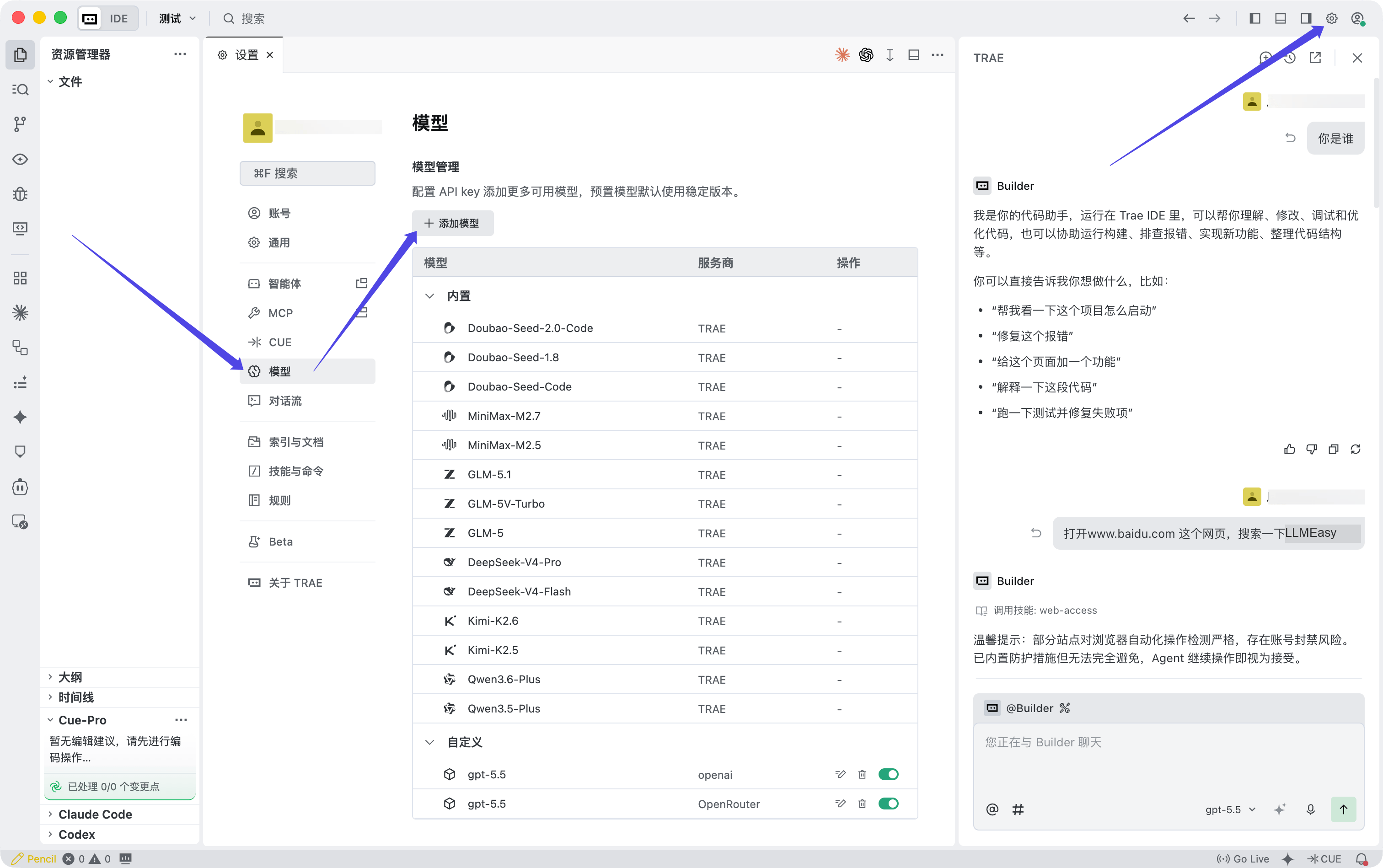 界面上显示 **添加模型** 窗口后,按下面的方式填写:
| 配置项 | 值 |
| ------- | ----------------------------------------------------------------------- |
| 服务商 | `OpenAI` |
| 模型 | `自定义模型` |
| 模型 ID | 从模型广场复制的 **GPT 分组模型 ID** |
| API 密钥 | 从 LLMEasy 控制台复制的 API Key |
| 自定义请求地址 | `https://www.llmeasy.ru/v1/chat/completions` |
界面上显示 **添加模型** 窗口后,按下面的方式填写:
| 配置项 | 值 |
| ------- | ----------------------------------------------------------------------- |
| 服务商 | `OpenAI` |
| 模型 | `自定义模型` |
| 模型 ID | 从模型广场复制的 **GPT 分组模型 ID** |
| API 密钥 | 从 LLMEasy 控制台复制的 API Key |
| 自定义请求地址 | `https://www.llmeasy.ru/v1/chat/completions` |
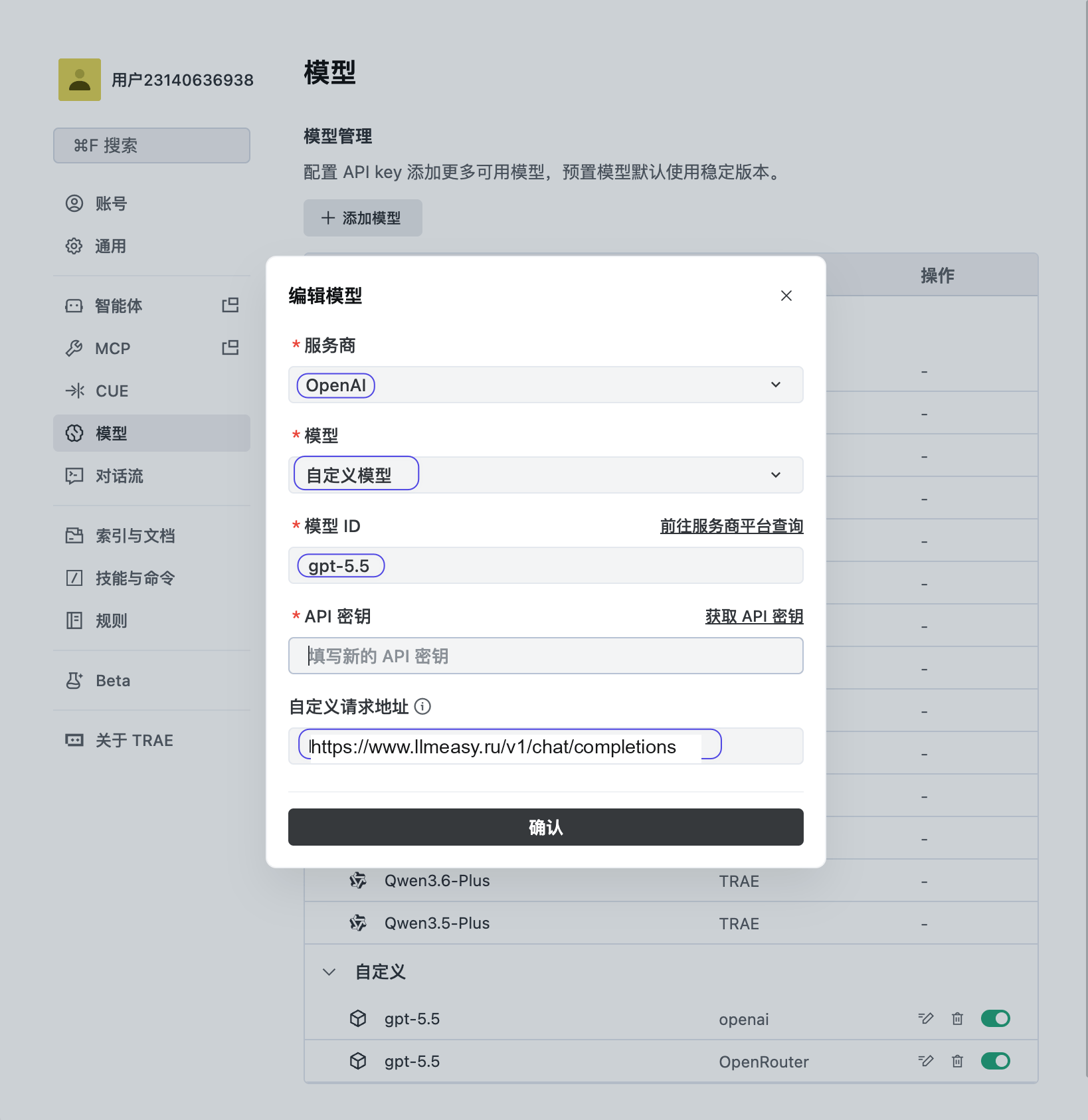 点击 **确认** 保存配置,然后选择刚添加的 GPT 分组模型开始使用。
TRAE 接入 LLMEasy 时,只有 **GPT 分组**模型支持使用。请不要填写 Claude 系列固定模型名,也不要把自定义请求地址写成 `https://www.llmeasy.ru/v1`。
## 相关 FAQ
* [OpenAI-compatible API 和 Anthropic-compatible API 有什么区别?](/zh/faq/concepts/openai-compatible-vs-anthropic-compatible)
* [MCP 和 API Key / Base URL 有什么区别?](/zh/faq/concepts/mcp-vs-api-key-base-url)
* [Codex CLI 中 model\_provider、base\_url 和 wire\_api 是什么?](/zh/faq/codex/model-provider-base-url-wire-api)
* [Cline 如何配置 OpenAI-compatible API?](/zh/faq/cline/openai-compatible-api)
点击 **确认** 保存配置,然后选择刚添加的 GPT 分组模型开始使用。
TRAE 接入 LLMEasy 时,只有 **GPT 分组**模型支持使用。请不要填写 Claude 系列固定模型名,也不要把自定义请求地址写成 `https://www.llmeasy.ru/v1`。
## 相关 FAQ
* [OpenAI-compatible API 和 Anthropic-compatible API 有什么区别?](/zh/faq/concepts/openai-compatible-vs-anthropic-compatible)
* [MCP 和 API Key / Base URL 有什么区别?](/zh/faq/concepts/mcp-vs-api-key-base-url)
* [Codex CLI 中 model\_provider、base\_url 和 wire\_api 是什么?](/zh/faq/codex/model-provider-base-url-wire-api)
* [Cline 如何配置 OpenAI-compatible API?](/zh/faq/cline/openai-compatible-api)