> ## Documentation Index
> Fetch the complete documentation index at: https://docs.llmeasy.ru/llms.txt
> Use this file to discover all available pages before exploring further.
# GitHub Copilot 自定义模型接入 LLMEasy 指南
> 在 VS Code 的 GitHub Copilot Chat 中通过 Custom Endpoint 配置 LLMEasy API Key 和 Base URL。
GitHub Copilot Chat 支持通过 **Custom Endpoint** 添加自定义模型。接入 LLMEasy 时,请使用 **GPT 分组** API Key,并选择 **Chat Completions**。
本文配置的是 VS Code 中 GitHub Copilot Chat 的自定义语言模型。它不会替换 GitHub Copilot 的行内代码补全服务。
## 前置条件
* 已安装最新版 VS Code
* 已安装并登录 GitHub Copilot / Copilot Chat
* 已获取 LLMEasy API Key(注册并获取)
* API Key 属于 **GPT 分组**
* 已确认要使用的模型 ID,例如 `gpt-5.5`
不要把真实 API Key 手动写进 `chatLanguageModels.json`。请在 VS Code 弹出的 API Key 输入框中粘贴 Key,VS Code 会自动生成 `${input:chat.lm.secret...}` 这种本机密钥引用。
## 配置步骤
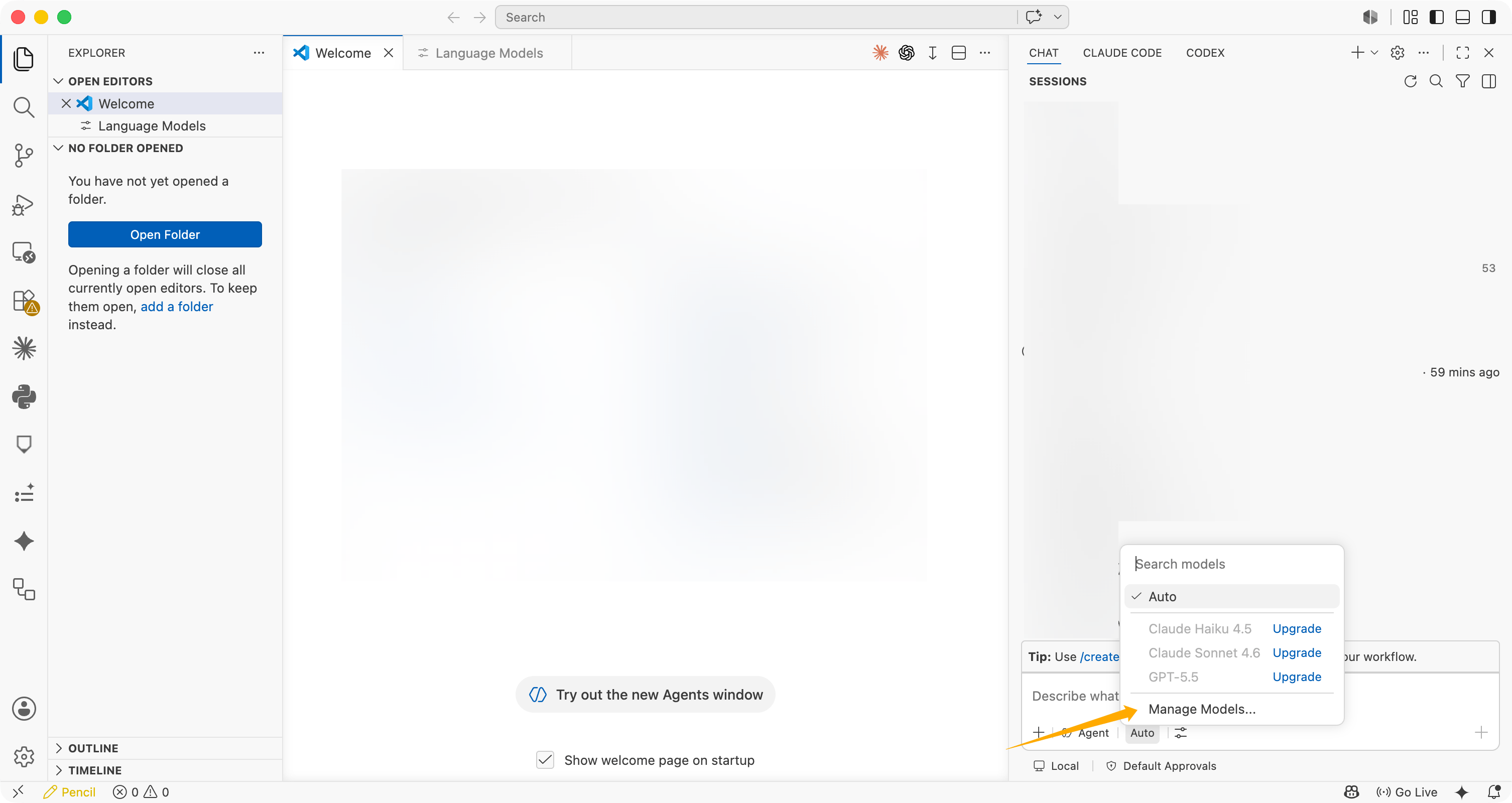
在 Copilot Chat 输入框下方,点击模型选择器,然后选择 **Manage Models...**。
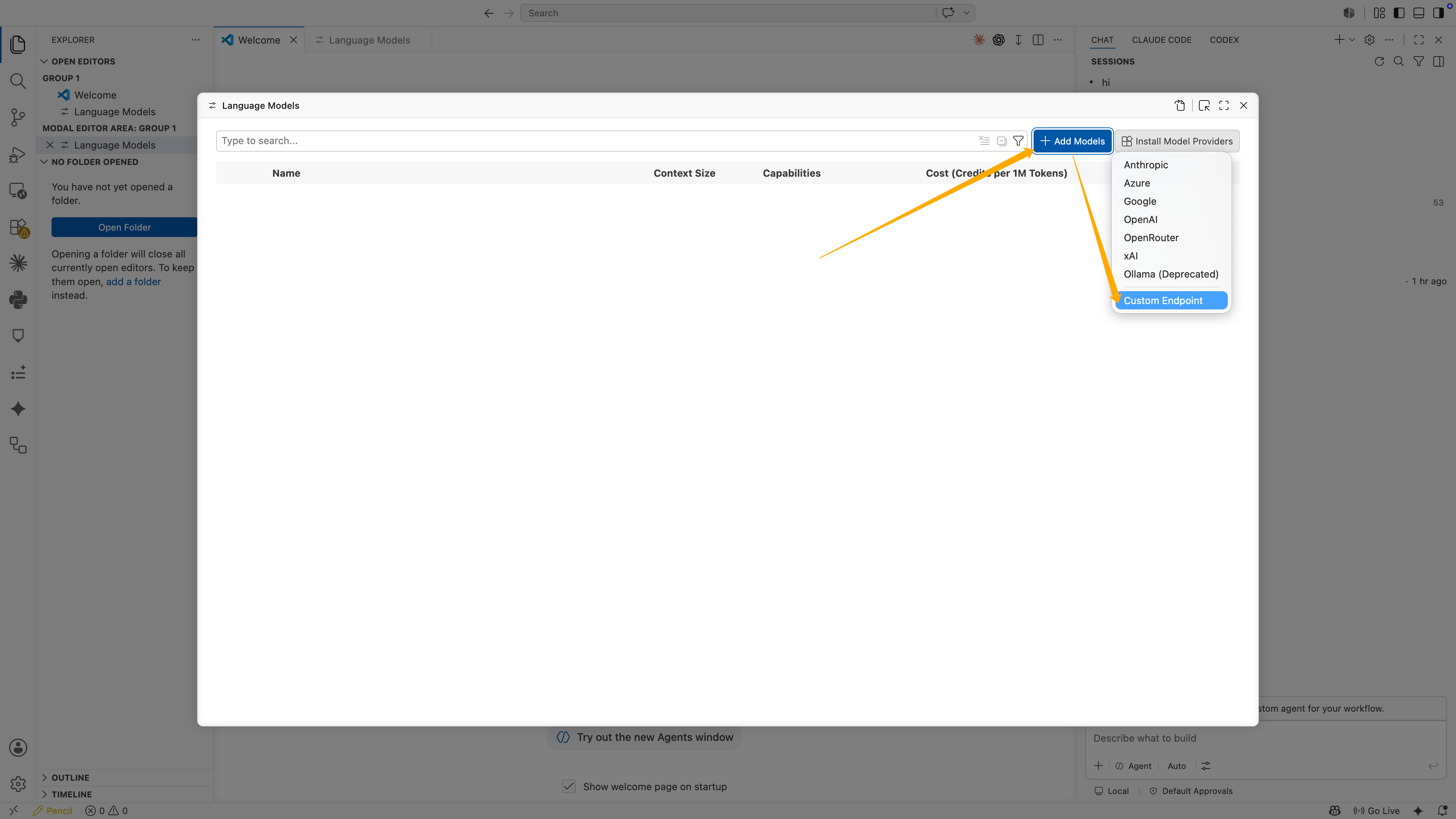
 在 **Language Models** 界面中,点击 **Add Models**,然后选择 **Custom Endpoint**。
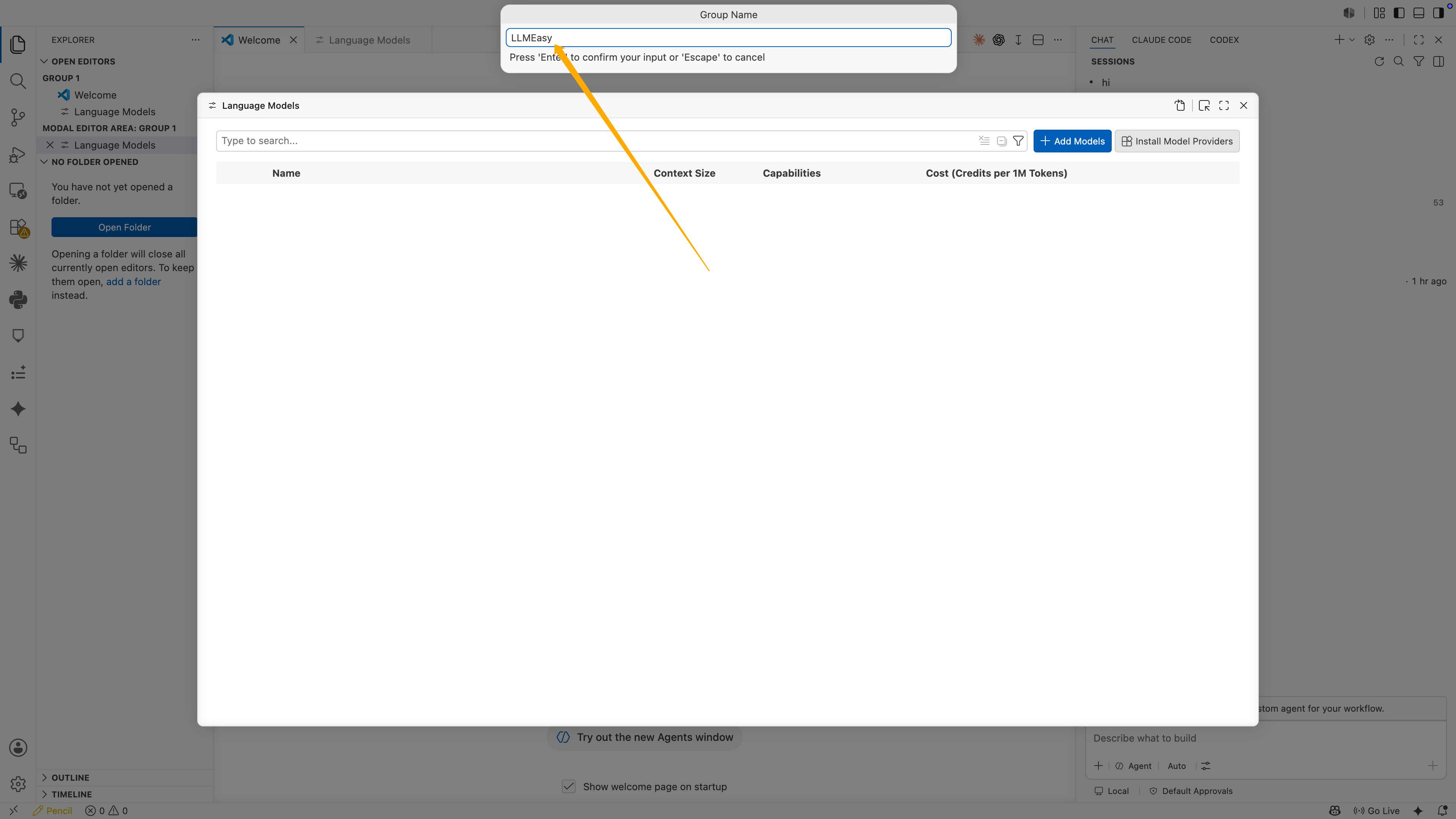
 在 **Group Name** 输入框中填写:
```text theme={null}
LLMEasy
```
然后按 **Enter**。
在 **Group Name** 输入框中填写:
```text theme={null}
LLMEasy
```
然后按 **Enter**。
 接下来 VS Code 会要求输入 API Key。粘贴你的 LLMEasy API Key,然后按 **Enter**。
这一步不会显示在配置文件里。VS Code 会把 API Key 保存成本机 secret,并在 JSON 中生成类似下面的引用:
```json theme={null}
"apiKey": "${input:chat.lm.secret.xxxxx}"
```
不要把 `${input:chat.lm.secret...}` 改成真实 API Key。保持 VS Code 自动生成的 secret 引用即可。
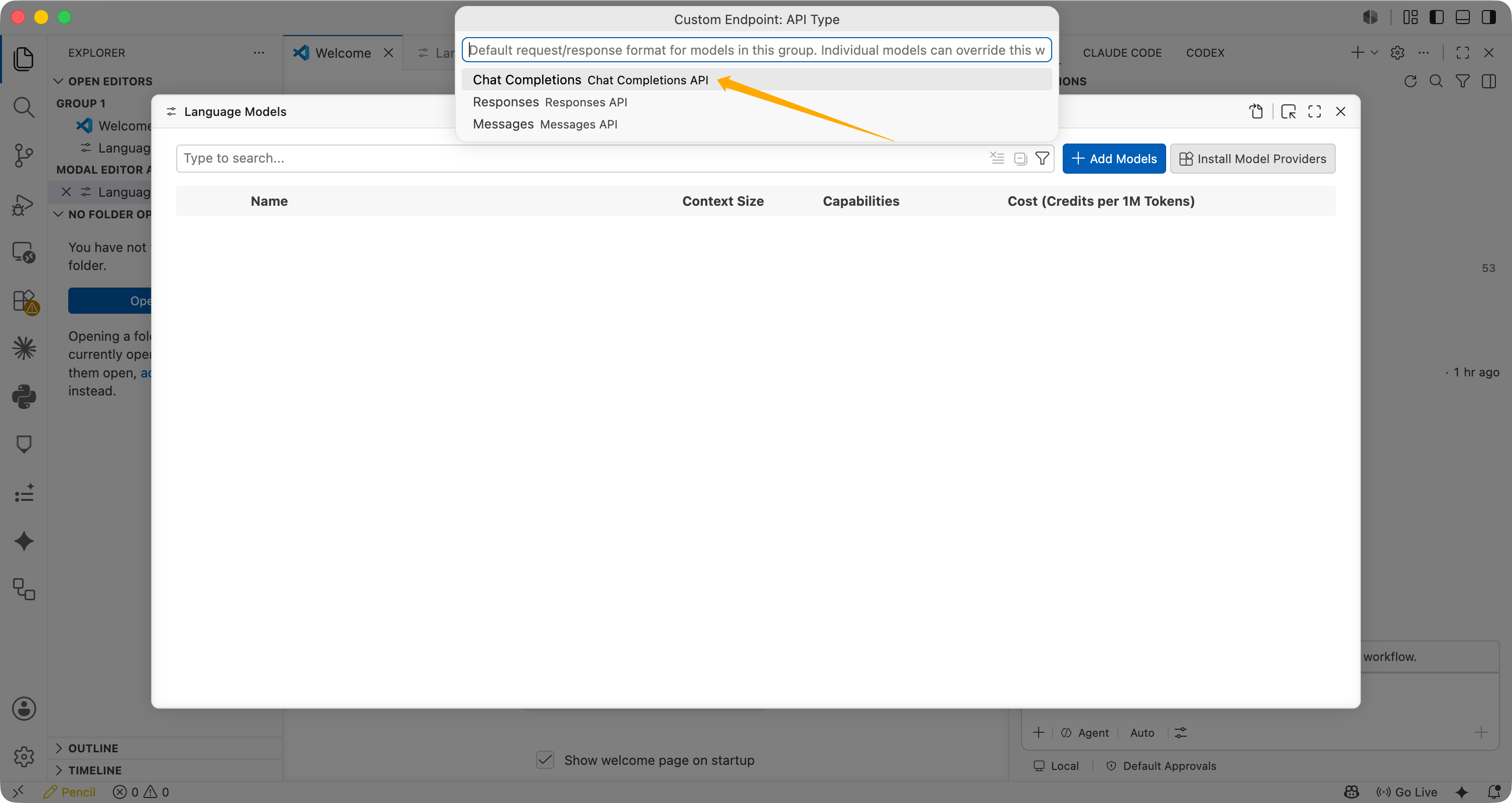
在 **Custom Endpoint: API Type** 中选择 **Chat Completions**。
接下来 VS Code 会要求输入 API Key。粘贴你的 LLMEasy API Key,然后按 **Enter**。
这一步不会显示在配置文件里。VS Code 会把 API Key 保存成本机 secret,并在 JSON 中生成类似下面的引用:
```json theme={null}
"apiKey": "${input:chat.lm.secret.xxxxx}"
```
不要把 `${input:chat.lm.secret...}` 改成真实 API Key。保持 VS Code 自动生成的 secret 引用即可。
在 **Custom Endpoint: API Type** 中选择 **Chat Completions**。
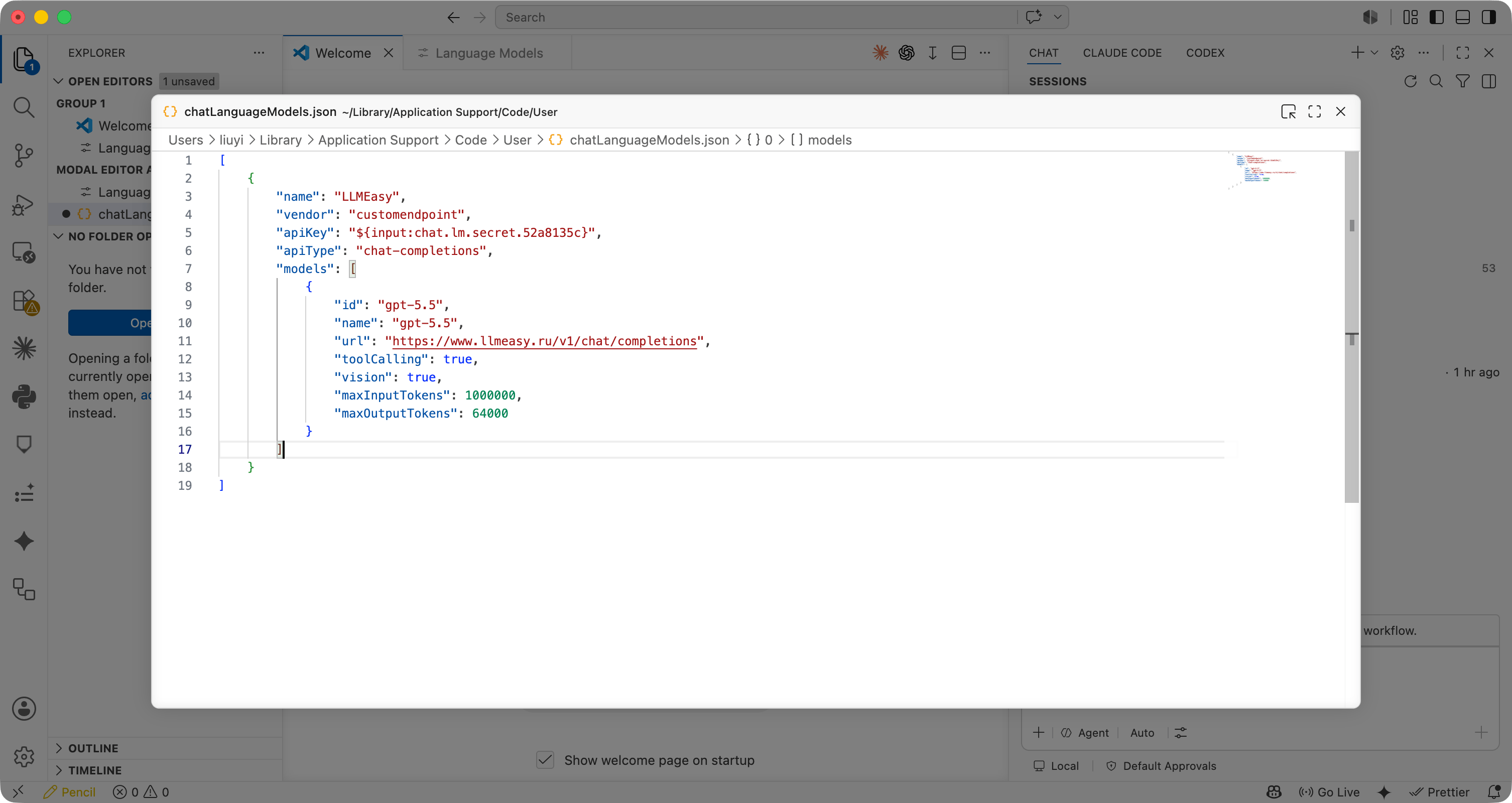
 VS Code 会打开 `chatLanguageModels.json`。确认或修改配置为下面结构:
 ```json theme={null}
[
{
"name": "LLMEasy",
"vendor": "customendpoint",
"apiKey": "${input:chat.lm.secret.xxxxx}",
"apiType": "chat-completions",
"models": [
{
"id": "gpt-5.5",
"name": "gpt-5.5",
"url": "https://www.llmeasy.ru/v1/chat/completions",
"toolCalling": true,
"vision": true,
"maxInputTokens": 1000000,
"maxOutputTokens": 64000
}
]
}
]
```
你需要重点确认:
| 字段 | 推荐值 |
| ----------------- | ---------------------------------------------------------------------------- |
| `name` | `LLMEasy` |
| `apiType` | `chat-completions` |
| `id` | `gpt-5.5` 或模型广场中的 GPT 分组模型 ID |
| `name` | 与模型 ID 保持一致 |
| `url` | `https://www.llmeasy.ru/v1/chat/completions` |
| `toolCalling` | `true` |
| `vision` | `true` |
| `maxInputTokens` | `1000000` |
| `maxOutputTokens` | `64000` |
保存 `chatLanguageModels.json` 后,执行:
```text theme={null}
Developer: Reload Window
```
重新加载后,回到 Copilot Chat 的模型选择器,选择 `gpt-5.5`。
在 Copilot Chat 中发送一条简单消息,例如:
```text theme={null}
用一句话说明你当前使用的模型。
```
如果能够正常回复,说明 LLMEasy Custom Endpoint 已配置成功。
## 常见问题
### 为什么必须在弹窗里输入 API Key?
VS Code 会把 API Key 保存到本机 secret 存储中,并在 JSON 里使用 `${input:chat.lm.secret...}` 引用它。这样比把真实 API Key 写进 JSON 更安全。
### 为什么选择 Chat Completions?
本次验证成功的配置使用的是 **Chat Completions**。对应 URL 是:
```text theme={null}
https://www.llmeasy.ru/v1/chat/completions
```
不要把它写成 `/v1/responses`,也不要只写到 `/v1`。
### 这个配置会影响 GitHub Copilot 自动补全吗?
不会。这个 Custom Endpoint 主要用于 Copilot Chat 的语言模型调用。GitHub Copilot 的行内自动补全仍由 GitHub Copilot 自身服务提供。
### 报 Invalid token 怎么办?
如果出现 `Invalid token`,按顺序检查:
1. API Key 是否是在 VS Code 弹窗中输入的
2. JSON 里是否保留 `${input:chat.lm.secret...}`
3. API Key 是否属于 **GPT 分组**
4. `url` 是否为 `https://www.llmeasy.ru/v1/chat/completions`
5. `apiType` 是否为 `chat-completions`
6. 模型 ID 是否为模型广场中的 GPT 分组模型
```json theme={null}
[
{
"name": "LLMEasy",
"vendor": "customendpoint",
"apiKey": "${input:chat.lm.secret.xxxxx}",
"apiType": "chat-completions",
"models": [
{
"id": "gpt-5.5",
"name": "gpt-5.5",
"url": "https://www.llmeasy.ru/v1/chat/completions",
"toolCalling": true,
"vision": true,
"maxInputTokens": 1000000,
"maxOutputTokens": 64000
}
]
}
]
```
你需要重点确认:
| 字段 | 推荐值 |
| ----------------- | ---------------------------------------------------------------------------- |
| `name` | `LLMEasy` |
| `apiType` | `chat-completions` |
| `id` | `gpt-5.5` 或模型广场中的 GPT 分组模型 ID |
| `name` | 与模型 ID 保持一致 |
| `url` | `https://www.llmeasy.ru/v1/chat/completions` |
| `toolCalling` | `true` |
| `vision` | `true` |
| `maxInputTokens` | `1000000` |
| `maxOutputTokens` | `64000` |
保存 `chatLanguageModels.json` 后,执行:
```text theme={null}
Developer: Reload Window
```
重新加载后,回到 Copilot Chat 的模型选择器,选择 `gpt-5.5`。
在 Copilot Chat 中发送一条简单消息,例如:
```text theme={null}
用一句话说明你当前使用的模型。
```
如果能够正常回复,说明 LLMEasy Custom Endpoint 已配置成功。
## 常见问题
### 为什么必须在弹窗里输入 API Key?
VS Code 会把 API Key 保存到本机 secret 存储中,并在 JSON 里使用 `${input:chat.lm.secret...}` 引用它。这样比把真实 API Key 写进 JSON 更安全。
### 为什么选择 Chat Completions?
本次验证成功的配置使用的是 **Chat Completions**。对应 URL 是:
```text theme={null}
https://www.llmeasy.ru/v1/chat/completions
```
不要把它写成 `/v1/responses`,也不要只写到 `/v1`。
### 这个配置会影响 GitHub Copilot 自动补全吗?
不会。这个 Custom Endpoint 主要用于 Copilot Chat 的语言模型调用。GitHub Copilot 的行内自动补全仍由 GitHub Copilot 自身服务提供。
### 报 Invalid token 怎么办?
如果出现 `Invalid token`,按顺序检查:
1. API Key 是否是在 VS Code 弹窗中输入的
2. JSON 里是否保留 `${input:chat.lm.secret...}`
3. API Key 是否属于 **GPT 分组**
4. `url` 是否为 `https://www.llmeasy.ru/v1/chat/completions`
5. `apiType` 是否为 `chat-completions`
6. 模型 ID 是否为模型广场中的 GPT 分组模型